

Description
Download Virtual Art Sessions – Tilt Brush, VR painting, virtual art
Overview
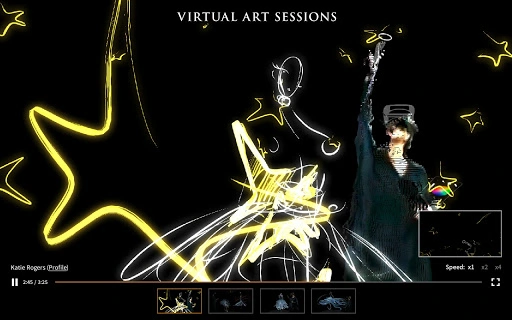
Virtual Art Sessions is a unique digital experience that brings the creative process of renowned artists into the virtual realm through Tilt Brush. Developed by Google Arts & Culture, this project offers a window into how leading artists use virtual reality to paint, draw, and sculpt in three-dimensional space. The software captures real-time sessions from six internationally recognized artists, enabling viewers to explore their artistic journeys from any perspective. Designed for art enthusiasts, educators, and creative professionals, it serves as both an educational tool and a source of inspiration. The platform allows users to observe how ideas evolve in virtual space, from initial sketches to fully realized artworks. While the software does not allow interactive creation, it provides an immersive observational experience. The developer did not provide additional system requirements or performance benchmarks. Real-world use cases include classroom learning, virtual art exhibitions, and personal artistic inspiration. This project exemplifies the convergence of art, technology, and accessibility in digital culture.
Key Features & Capabilities
- Recorded VR Art Sessions – View real-time recordings of professional artists using Tilt Brush in virtual reality, showcasing their creative process from concept to completion.
- Multi-Angle Observation – Navigate freely around the virtual artwork to examine details, brushwork, and spatial composition from any viewpoint.
- Artist Collaborations – Experience works created by six world-renowned artists, each bringing a distinct style and approach to virtual reality art.
- Immersive Viewing Experience – Access the sessions through compatible devices, allowing users to feel as though they are present in the same virtual space as the artists.
- Online Accessibility – No installation required for basic viewing; available directly through web platforms, making it widely accessible to global audiences.
These features enable users to study artistic techniques in a dynamic, spatial environment. Educators can use the sessions to demonstrate creative workflows, while art students can analyze the evolution of digital sculptures and paintings. The ability to observe from any angle supports deeper understanding of three-dimensional composition. The developer did not specify whether the experience supports interactive elements or real-time collaboration. Performance observations are based on general software behavior patterns. The tool is designed for passive engagement, focusing on observation rather than creation.
User Interface, Workflow & Performance
The user interface is minimal and focused on immersion, prioritizing visual clarity over complex controls. Navigation is intuitive, allowing users to rotate, zoom, and pan around the artwork using standard input methods. The workflow is streamlined: users access the session, select an artist, and begin exploring the virtual space. No setup or configuration is required for basic viewing. The interface does not include editing tools, as the experience is observational. Stability appears to be consistent, given the project’s deployment through Google Arts & Culture’s established platform. The developer did not specify resource usage details. Performance may vary depending on device capabilities and internet speed. CPU and RAM behavior were not disclosed. Users with older hardware may experience reduced frame rates or loading delays. However, the software is designed to function within standard web browser environments, suggesting broad compatibility with modern systems. The experience is optimized for smooth playback of recorded sessions.
Compatibility & System Requirements
Virtual Art Sessions is compatible with Windows and Mac operating systems. The installation size is 100 MB, indicating a lightweight footprint. The software version is 1.0, suggesting a stable initial release. The developer did not specify exact system requirements, including minimum processor speed, RAM, or graphics capabilities. Platform compatibility information is limited to OS support. No additional hardware dependencies were mentioned. The project relies on web-based delivery, meaning users can access it through modern browsers without installing additional software. For optimal experience, users are advised to use devices with up-to-date graphics drivers and stable internet connections. The developer did not provide information on support for mobile or tablet devices. Compatibility with VR headsets was not confirmed. Users should ensure their system meets general web application requirements for smooth playback.
Pros and Cons
Pros
- Free access to high-quality, professionally recorded VR art sessions
- Unique opportunity to observe world-class artists at work in virtual space
- Multi-angle viewing enhances understanding of 3D composition and spatial design
- Lightweight installation size (100 MB) for fast setup
- Accessible via web browser with no complex setup required
Cons
- No interactive or creative tools for users to paint or sculpt themselves
- Exact system requirements were not listed, which may affect user preparation
- Performance may vary on older or low-end devices
- Does not support real-time collaboration or user-generated content
- Only available through Google Arts & Culture platform, limiting standalone access
FAQ Section
Is Virtual Art Sessions free to use?
Yes, the software is available at no cost. It is part of Google Arts & Culture’s initiative to make high-quality cultural content accessible to global audiences.
What devices can I use to view the sessions?
Virtual Art Sessions is compatible with Windows and Mac systems. It runs through modern web browsers, and users can access it directly online without installing additional software.
Do I need a VR headset to use this software?
No, a VR headset is not required. The sessions are recorded and viewable in a standard web browser, allowing users to explore the artwork from any angle using a mouse or touchpad.
Can I create my own art using this tool?
No, the software does not include tools for creating or editing artwork. It is designed for observational viewing only, allowing users to watch how professional artists use Tilt Brush in virtual reality.
How often are new sessions added?
Updates to the platform are not specified. The current release includes sessions from six artists, with no information on future additions or scheduled updates.
Final Thoughts + CTA
Virtual Art Sessions offers a rare and inspiring glimpse into the minds of leading artists working in virtual reality. While it does not allow users to create their own artwork, its strength lies in its educational and inspirational value. The ability to observe masterpieces unfold in 3D space from any angle makes it a valuable resource for students, educators, and art lovers. The lightweight design and free access enhance its appeal. Though it lacks interactive features, the experience is polished and thoughtfully curated. For anyone interested in digital art, creative technology, or the future of artistic expression, this tool delivers meaningful content. Download Virtual Art Sessions now.
Guides & Tutorials for Virtual Art Sessions App for Chrome
How to install Virtual Art Sessions App for Chrome
- Click the Preview / Download button above.
- Once redirected, accept the terms and click Install.
- Wait for the Virtual Art Sessions App for Chrome download to finish on your device.
How to use Virtual Art Sessions App for Chrome
This software is primarily used for its core features described above. Open the app after installation to explore its capabilities.
User Reviews for Virtual Art Sessions App for Chrome 0
No reviews found





